
IC Markets MAM Activation Process
Open and authorize your account to auto-sync strategies.
🤝 Create Account
To ensure you can join the strategy and receive technical support, your account must be under the Mr.Forex IB/Agent.
⚠️ Already have an account? Please send an IB transfer request email.
Please place my account under the Partner / IB: [13481]. I would like to receive services from this partner.
Thank you.
* After sending, please take a screenshot of the reply and send it to us in the final step.
✒️ Sign Limited Power of Attorney (LPOA)
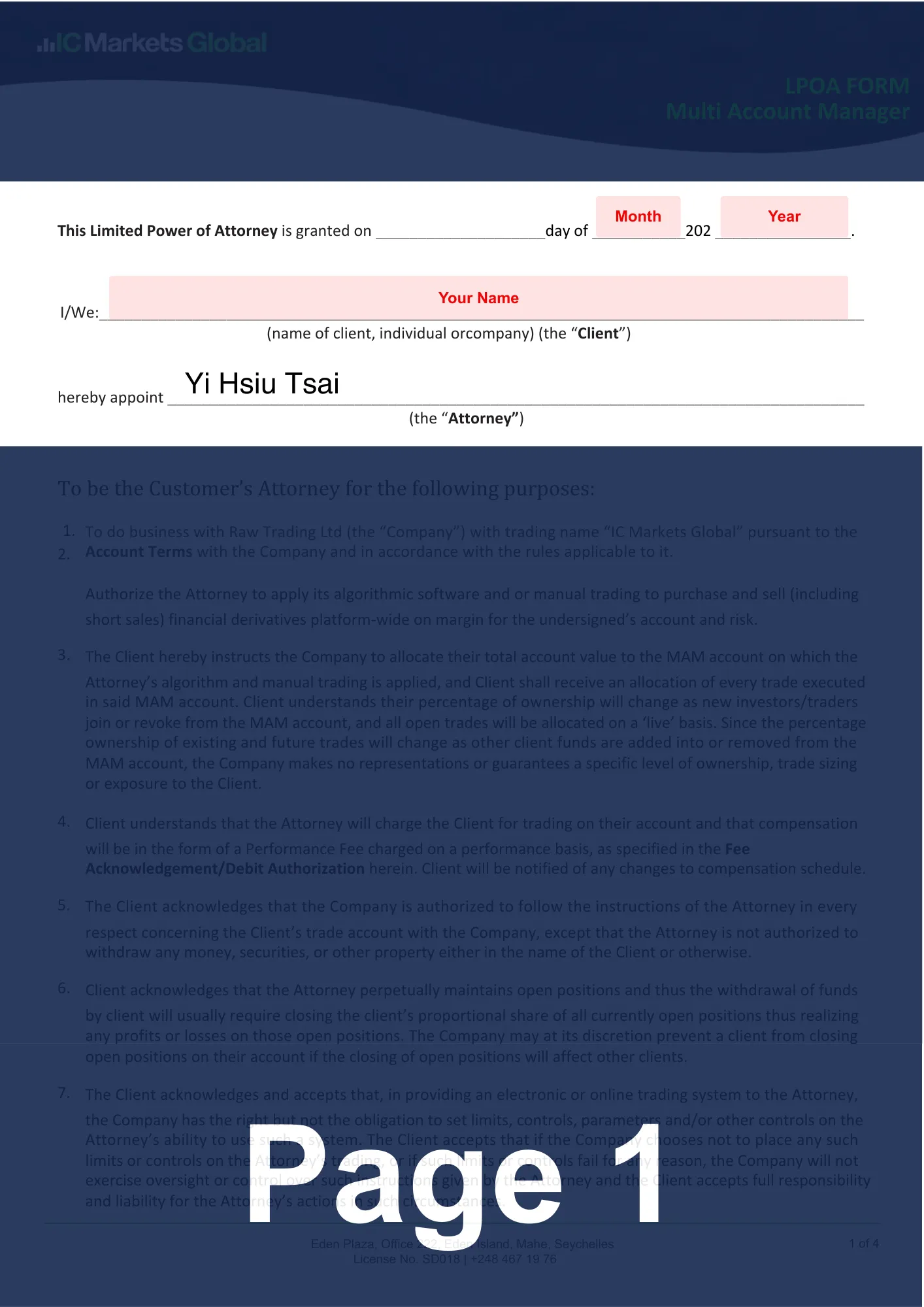
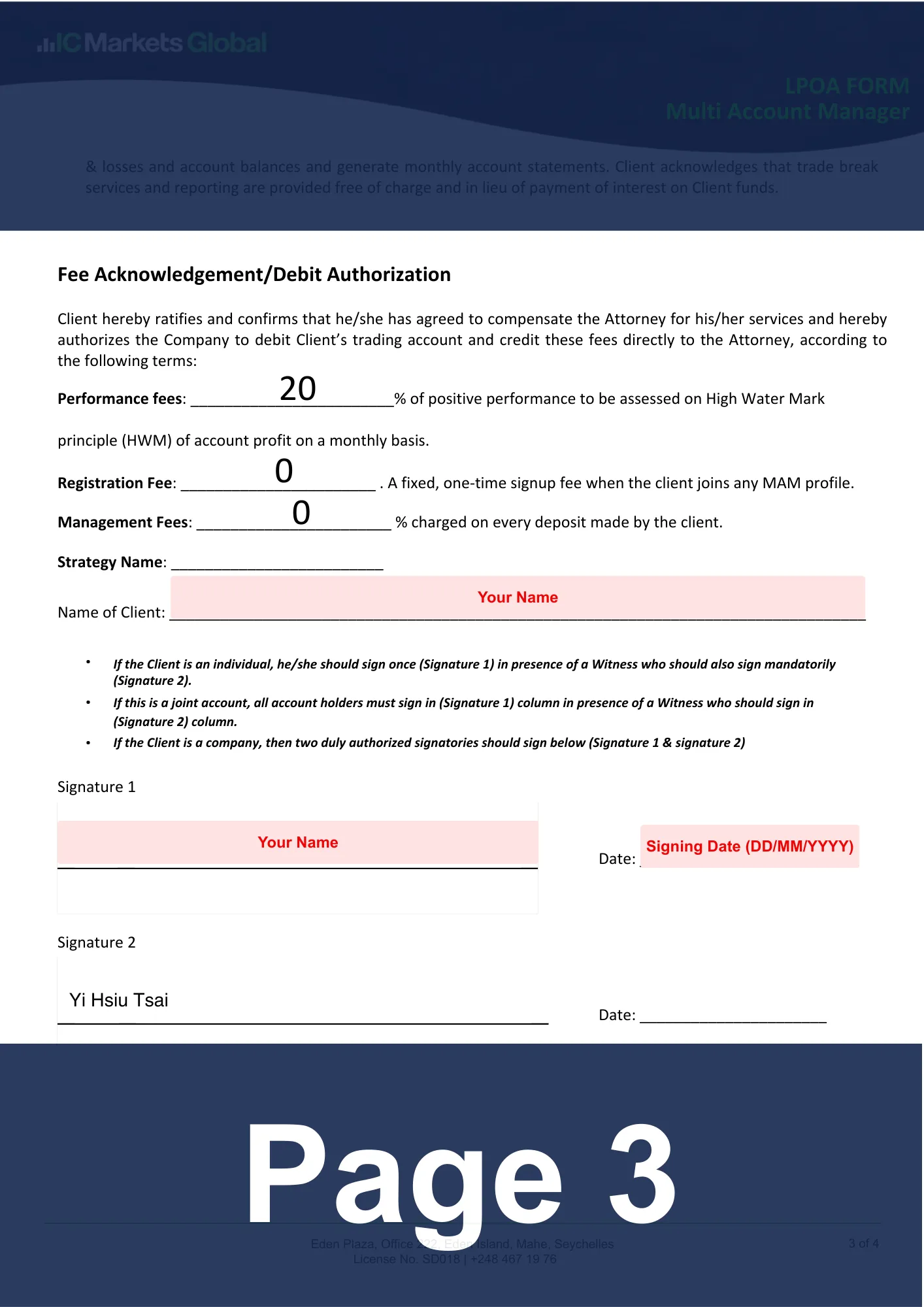
Download the pre-filled LPOA and complete the remaining info.
- Client: Fill in your English name (must match your account opening ID).
- Strategy Name: Enter the trading strategy name.
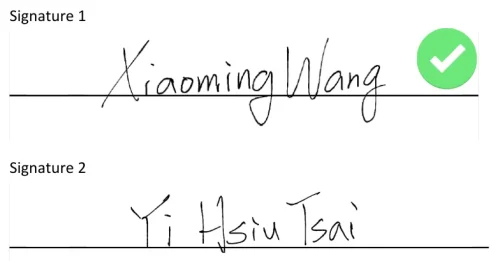
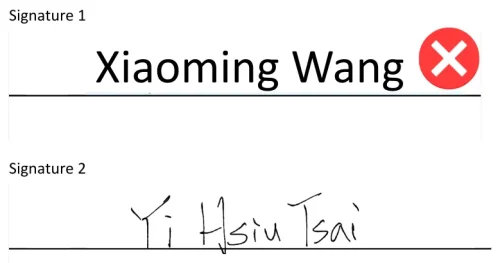
- Signature 1: Sign your name.
- Date: Fill in the date of signing.
- Use the Sign function for e-signatures, not Text.
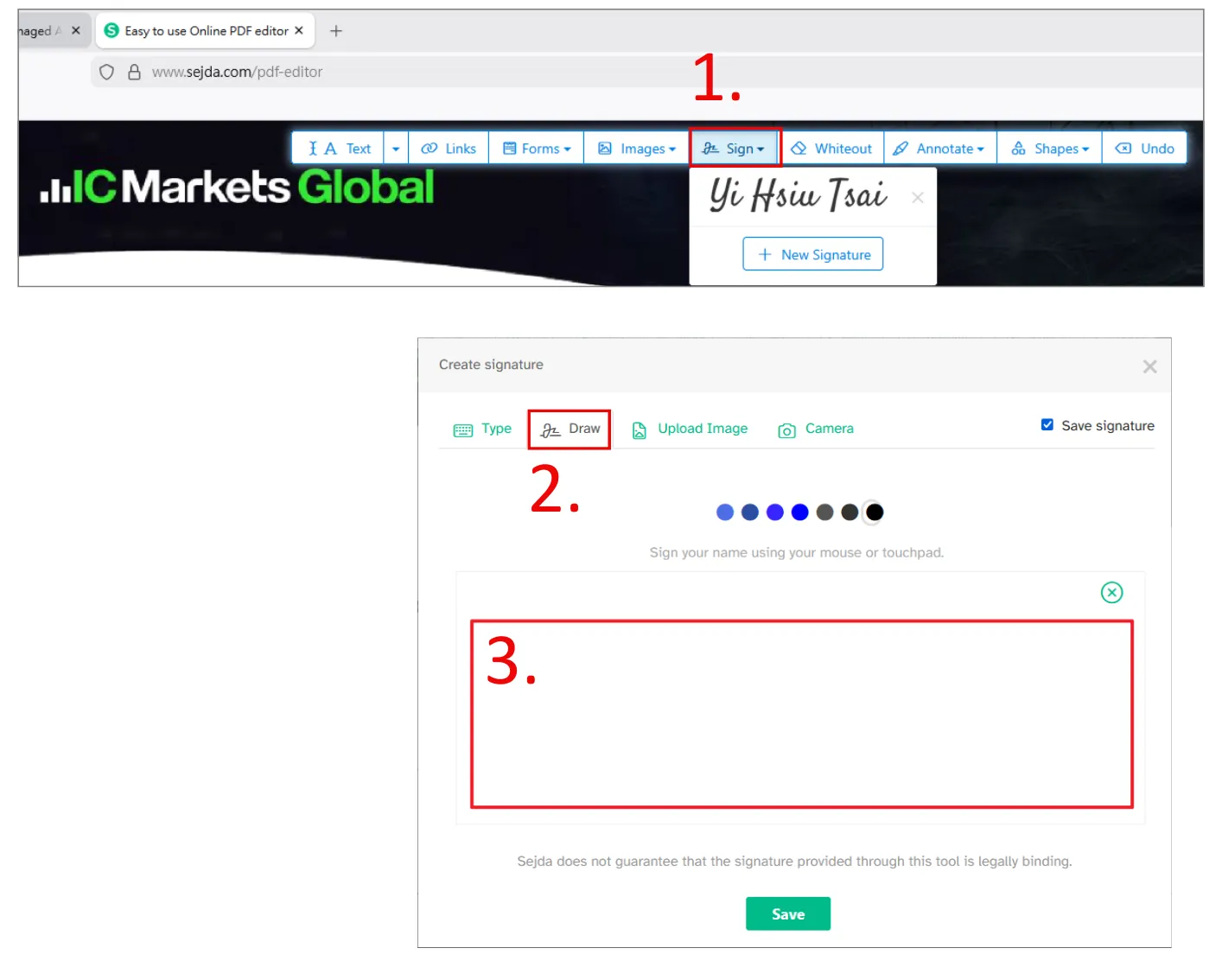
* This authorization only allows us to "execute trades"; we have no authority to perform any withdrawal operations.
✉️ Send email to IC Markets
Please attach the document you just signed and send it to the official email address: [email protected].
I would like to join Mr.Forex MAM strategy.
Strategy Name: [Fill in the strategy name, such as Alpha Gold]
Attached is my LPOA for setup. Thank you.
⌛ Awaiting Review and Deposit
Review usually takes 1 business day. Once you receive the activation notice, please "internally transfer" or "deposit" funds into that MAM sub-account, and the strategy will start automatically.
🔍 Monitoring and Fund Management
📈 View Real-time Performance
You can log in to your MAM sub-account anytime to view performance; the process is completely transparent, protecting your rights.
🛑 How to stop the service?
You maintain full control of your funds. If you wish to stop, simply fill out the "MAM Transfer Form" and send it back to the official email to disconnect the link.
📊 Performance Fee and Settlement Mechanism
We use the High-Water Mark model to calculate performance fees. We only collect a profit share when your account profit reaches a new high.
⚙️ Automatic Deduction
Settlement: Monthly settlement occurs on the activation date via auto-deduction.
🛡️ Protection of Funds
If there is no profit or a loss occurs that month, the system will not deduct any fees until your account recovers the losses and reaches a new high.
💡 Mr.Forex Investment Plan: FAQ
The performance looks great. How can I join the plan?
- Account Opening: Use the exclusive link to open a personal trading account with a designated compliant broker.
- Plan Confirmation: Contact Mr.Forex support to confirm your strategy and the most suitable investment plan.
- Sync Activation: Complete the Limited Power of Attorney (LPOA) or Copy Trading setup as guided.
- Automated Trading: Once funded, your account syncs automatically to mirror Mr.Forex signals and performance.
What is "Fund Management (MAM / PAMM)"?
- How it Works: Your account synchronizes buy/sell signals directly on the broker's server side.
- Key Features: High speed, stability, zero configuration. Direct server-side data exchange ensures top-tier execution precision and slippage control. This is the premier choice for long-term investors seeking ultimate stability.
What is "Copy Trading"?
- How it Works: Strategy signals are transmitted to your account in real-time via the broker's designated social trading platform.
- Key Features: Intuitive, user-friendly, fast startup. It offers a friendly interface for "one-click following." Regardless of experience, you can easily participate and monitor your investments in real-time.
Is my capital safe? Can you withdraw my funds?
Regardless of the chosen plan, we only obtain "trade execution rights." Broker systems strictly prohibit any third party from withdrawing your funds. Only you hold the exclusive authority to deposit and withdraw funds.
How can I track my performance? Is the process transparent?
- Daily Electronic Statements: The broker automatically sends detailed Daily Statements to your registered email.
- Mobile App Monitoring: Log in to the broker’s app or client portal anytime to view real-time balance and profits.
- Flexible Viewing Rights: Depending on your plan, you can view every open position in real-time via MT4/MT5 or the copy trading interface.
What are the fees, and how are they calculated?
Can I stop the investment plan at any time?
The current minimum deposit is a bit high. Are there lower-threshold options?
- Need immediate assistance? Please click the live chat icon in the bottom right.





- +886-975-033-230
 繁體中文
繁體中文  العربية
  বাংলা
বাংলা  简体中文
简体中文  香港中文
香港中文  Čeština
  Dansk
Dansk  Nederlands
  English
  Français
  Deutsch
  Ελληνικά
  हिन्दी
  Magyar
  Bahasa Indonesia
  Italiano
  日本語
日本語  한국어
한국어  Bahasa Melayu
  Norsk bokmål
  Polski
  Português do Brasil
  Português
  Română
  Русский
  Español de Argentina
  Español de México
  Español
  Svenska
  ไทย
ไทย  Türkçe
  Українська
  اردو
اردو  Tiếng Việt