

Welcome to Mr.Forex's tutorial. Trading on MT4 for iPhone is very convenient, but the login interface can be a bit hidden for first-time users.
Many beginners accidentally tap "Open a demo account" after downloading the App, resulting in an official testing account that cannot be used for trading. Or, they fail to find the server because they didn't input the full name when searching for the broker's server.
This guide will teach you step-by-step how to correctly log in to your broker's "Real" or "Demo" account on iPhone (iOS).
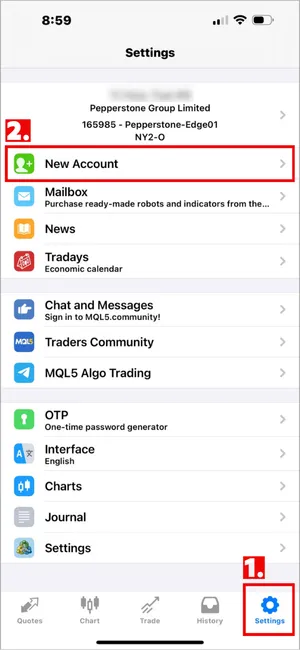
Next, tap the "New Account" option at the top.
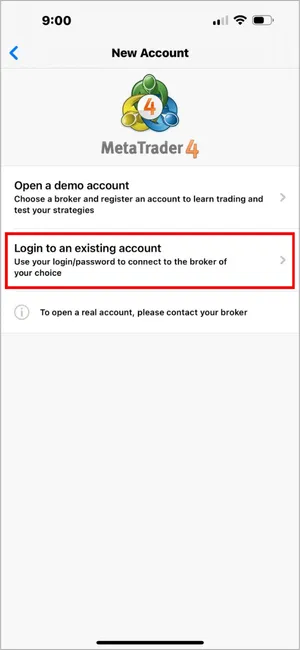
Please make sure to select the second option: "Login to an existing account".
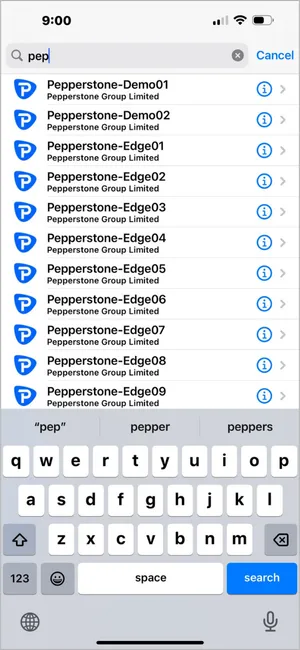
Please enter the full server name provided by your broker in your email (e.g., "Pepperstone-Edge01"), do not just enter the company abbreviation. Once found, tap on that server.
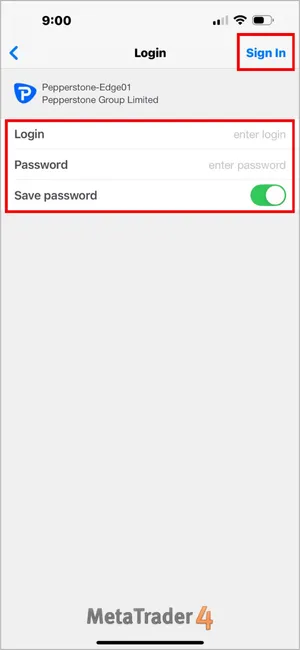
If the login is successful, the screen will automatically jump back to the "Settings" page, and you will see your name and account number appear at the top.
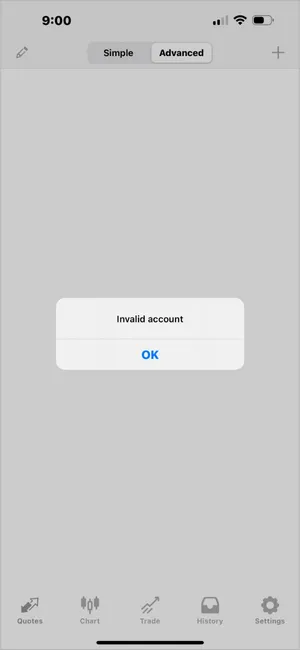
This is usually due to two reasons:
Many beginners accidentally tap "Open a demo account" after downloading the App, resulting in an official testing account that cannot be used for trading. Or, they fail to find the server because they didn't input the full name when searching for the broker's server.
This guide will teach you step-by-step how to correctly log in to your broker's "Real" or "Demo" account on iPhone (iOS).
MT4 iOS Login Process
Step 1: Go to Account Management
After opening the MT4 App, tap "Settings" at the bottom right corner of the screen.Next, tap the "New Account" option at the top.
Step 2: Choose Login Mode (Crucial)
Two options will appear here. Please note, whether you are logging into a "Real Account" or a "Demo Account" provided by your broker, do not choose the first option.Please make sure to select the second option: "Login to an existing account".
Step 3: Search and Select Server
You will then enter the server selection page. The search box at the top will say "Enter company or server name".Please enter the full server name provided by your broker in your email (e.g., "Pepperstone-Edge01"), do not just enter the company abbreviation. Once found, tap on that server.
Step 4: Enter Account and Password
Finally, at the login screen, please fill in the following:- Login: Your trading account number.
- Password: Your "Master Password".
- Save password: Recommended to turn this ON to avoid re-entering it next time.
If the login is successful, the screen will automatically jump back to the "Settings" page, and you will see your name and account number appear at the top.
Troubleshooting Login Failures
Problem A: Shows "Invalid account" after logging in?
If the account list shows a red "Invalid account" message (as shown below) after you log in, it means the login failed.
This is usually due to two reasons:
- Wrong Password: Please check if the case sensitivity is correct.
- Wrong Server: This is the most common error on the mobile version. Please check your account opening email again to confirm if you should choose Live01 or Live02; even a single digit difference will cause a failure.
Problem B: Why can't I find my broker's server?
The search function on the iOS version can sometimes be sensitive.- Advice: Try typing just the "first few English letters" of the broker's name, do not type the full name, and let the system automatically list the options for you.
- Note: Ensure your internet connection is normal, otherwise the server list cannot update.











 繁體中文
繁體中文  العربية
  বাংলা
বাংলা  简体中文
简体中文  香港中文
香港中文  Čeština
  Dansk
Dansk  Nederlands
  English
  Français
  Deutsch
  Ελληνικά
  हिन्दी
  Magyar
  Bahasa Indonesia
  Italiano
  日本語
日本語  한국어
한국어  Bahasa Melayu
  Norsk bokmål
  Polski
  Português do Brasil
  Português
  Română
  Русский
  Español de Argentina
  Español de México
  Español
  Svenska
  ไทย
ไทย  Türkçe
  Українська
  اردو
اردو  Tiếng Việt