TMGM MAM Activation Process
Open and authorize your account to auto-sync strategies.
🤝 Create Account
To ensure you can join the strategy and receive technical support, your account must be under the Mr.Forex IB/Agent.
⚠️ Already have an account?
Due to TMGM's official policy of not accepting agent (IB) changes, if you already have an account, please prepare a brand-new email address and click the link above to register a new account.
🔗 Account Binding and Authorization
TMGM's MAM is "invitation-only," please follow the process below:
1️⃣ Provide Information: After completing registration, please send your "Registration Email", "English Name (Pinyin)", and the "Signal Name you wish to join" to Mr.Forex Customer Service.
2️⃣ Send Invitation: Our team will send the MAM link invitation to you via the backend.
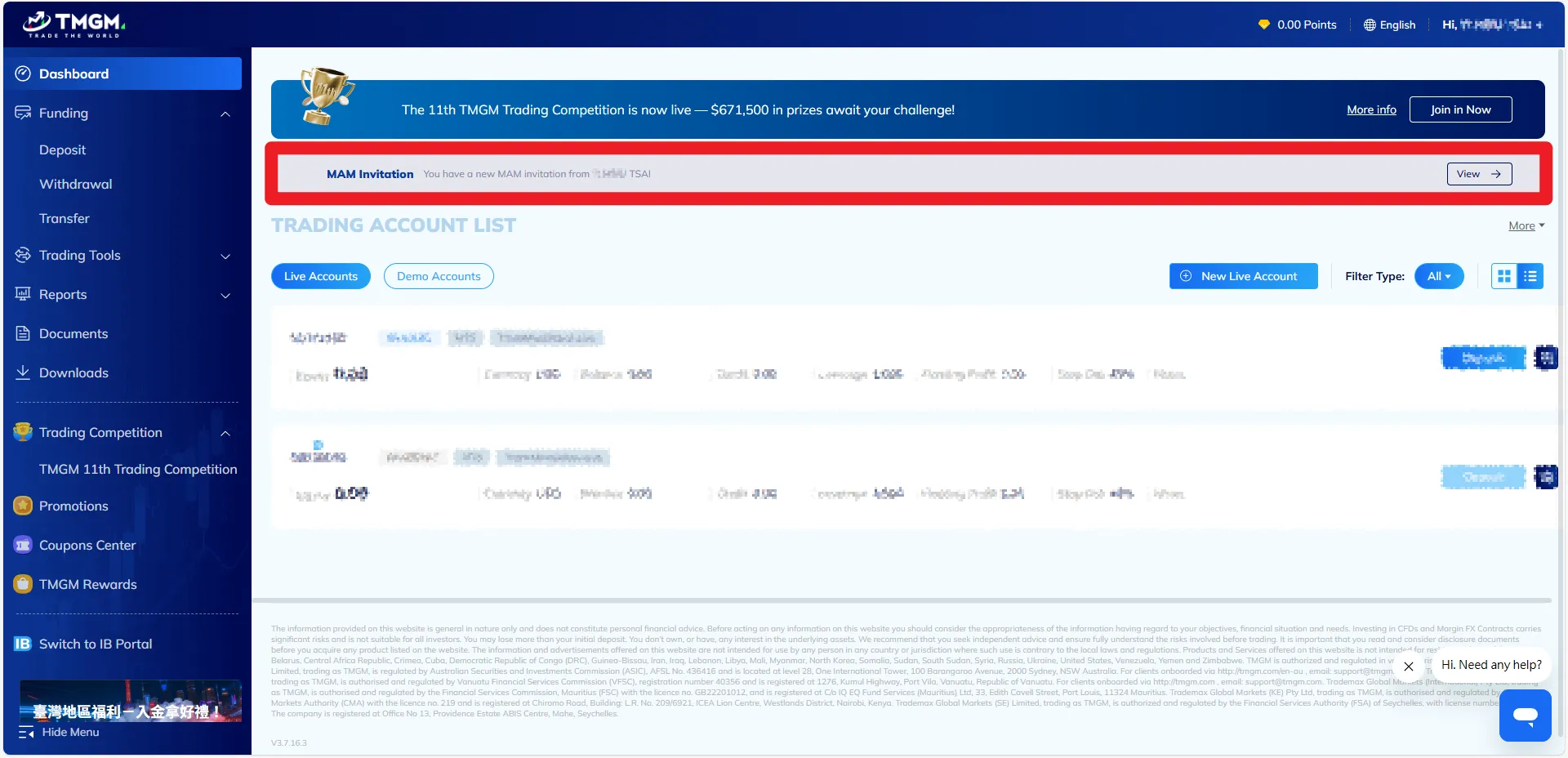
3️⃣ Login and Accept: Once we notify you that the invitation has been sent, please log in to the TMGM client portal.
4️⃣ Sign LPOA: Click "Accept Invitation" in the portal, read the details carefully, and complete the LPOA (Limited Power of Attorney) electronic signature online.
* This authorization only allows us to "execute trades"; we have no authority to perform any withdrawal operations.
5️⃣ Deposit and Activation: After signing is complete, please "Deposit" or perform an "Internal Transfer" of funds to the MAM sub-account. The strategy will then automatically activate.
🔍 Monitoring and Fund Management
📈 View Real-time Performance
You can log in to your MAM sub-account anytime to view performance; the process is completely transparent, protecting your rights.
🛑 How to stop the service?
The funds remain entirely in your name. If you wish to stop following the strategy, simply transfer the funds from your "MAM sub-account" to another "trading account" or "withdraw directly" via the client area, and the link will be automatically disconnected.
📊 Performance Fee and Settlement Mechanism
We use the High-Water Mark model to calculate performance fees. We only collect a profit share when your account profit reaches a new high.
⚙️ Automatic Deduction
No manual transfer is required. The system will automatically settle last month's performance and deduct fees directly from your account balance.
🛡️ Protection of Funds
If there is no profit or a loss occurs that month, the system will not deduct any fees until your account recovers the losses and reaches a new high.
Frequently Asked Questions
Q1: Do I need to transfer funds to you? Can you withdraw my money?
- Money Management & VPS Hosting:
We only hold "trading rights" and are restricted by an LPOA (Limited Power of Attorney), which strictly prohibits third-party withdrawals. - Copy Trading:
The system only replicates signals; the funds are completely under your control. Only you possess the access and withdrawal rights to your funds.
Q2: How is the profit share collected? Is there a fee if I don't make a profit?
Q3: Can I stop the service or withdraw funds at any time?
Q4: Why is the minimum capital for the "VPS Hosting" higher than for "Money Management" or "Copy Trading"?
Q5: How are extreme market conditions (e.g., war, economic data releases) handled?
Q6: Why can't I view the investment plan operating procedures even though I've registered?
- 📚 Online Courses / 🏆 Trading Competitions: Open Globally.
Regardless of your location, you can purchase courses to learn techniques or participate in competitions to win cash prizes. - 📉 Copy Trading / 💰 Money Management / 🤖 VPS Hosting: Restricted regionally.
Due to regulations, these financial services cannot be provided to retail users in Taiwan and the United States. If you declare residence in these areas during registration, the system will automatically hide the relevant operation buttons.
If you are a Taiwan user and are interested in our services, please contact customer service directly for qualification review and consultation.
- Need immediate assistance? Please click the live chat icon in the bottom right.
- +886-975-033-230